

Wake Forest Student Technology

Welcome to Wake Forest University
Congratulations on becoming a Demon Deacon! Technology plays a key role in student studies, learning, research and campus life at Wake Forest.
Before you arrive
- Activate your WFU Account using instructions from in the email address from your admissions application. More on this process.
- Sign into your WFU email at google.wfu.edu using your full wfu.edu email address.
- Enable Google 2-Step Verification within 30 days of activation to avoid getting locked out. Password changes are managed through account.wfu.edu.
- All undergraduate students must have a laptop meeting minimum requirements. WakeWare laptops include four years of repairs at The Bridge IT Service Desk. Learn more at wakeware.wfu.edu or purchase online at go.wfu.edu/buywakeware
- IT Help: The Bridge is Wake Forest’s name for the Information Systems Help Desk. Add us to your phone’s contacts by scanning this QR code with your camera:

- Wait before buying any software. Many software applications are included in tuition. Students have access to licensing for Microsoft365, Adobe Creative Cloud, at no cost: software.wfu.edu
- Visit Canvas, a digital home for many of your courses. View course materials, assignments, discussion boards, grades, and more, and a great mobile app.
- Visit and explore Workday to manage tasks including tuition payment, advising, and course registration. Consider installing the Workday mobile app.
- Establish regular laptop backups using a cloud service (like Google Drive for Desktop).
Once you’re here
Wireless Internet
On campus, connect to eduroam wifi, which is secure and offers fast access in campus buildings and many outdoor locations: go.wfu.edu/eduroam
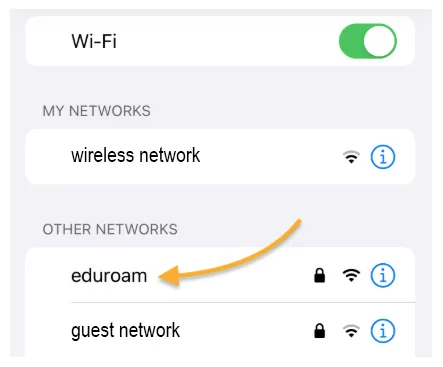
Note: Some gaming and less traditional devices need a workaround for wireless. If eduroam does not work, visit go.wfu.edu/mydevices to join.
Tech Support
Visit us at Information Systems’ The Bridge in the ZSR Library for friendly IT support and WakeWare repairs. go.wfu.edu/TheBridge

On-campus laptop repair coverage
WakeWare laptops include four years of included repairs at The Bridge. For other models, consider adding on-campus repair coverage (“SafeWare”). Visit or contact the Taylor Bookstore to learn more: go.wfu.edu/bookstoreHelp
Television
Access dozens of live television channels, on-demand and DVR recording, on campus, by accessing Stream2 online. is.wfu.edu/stream2
Printing
See locations, instructions, and more about campus printing at is.wfu.edu/printing.
Good to know
- Interested in Working on Campus?
 The Bridge is always excited to connect with students from all academic backgrounds—no Computer Science or IT experience is required.
 - STAC
 Interested in technology and how it impacts the student experience? Represent the student body on The Student Technology Advisory Committee (STAC)!
 - WakerSpace
 The WakerSpace is the Wake Forest community makerspace! As a student, you have access to instruction and use of 3D printers, laser cutters, knitting, podcasting, and much more.
 - Adobe Student Ambassadors
 As an Ambassador for Wake Forest, you’ll assist in raising awareness about Adobe Creative Cloud via events, workshops, social media and other campus outreach activities.
 - Technology Ambassadors
 The Technology Consultant Program provides an opportunity to enhance digital literacy and media literacy skills as well as leadership capabilities.