Vibe Coding…an AI journey
by Paul Whitener
This is a glance into my ongoing journey to create a viable, simple, and effective check-in/out system for WakerSpace using generative AI to achieve that goal. Since WakerSpace opened in 2018, there has always been a way for maker’s visits to be logged as they came into WakerSpace to make and when they left. This is a very important part of how utilization and traffic have been measured. This utilization data is used for many different things including reporting to the administration and requesting additional supply funding to cover the increase in usage.
The first check-in/out system used to track maker’s activities started as a Google sheet. While this did provide a basic way to track maker’s time in and out and what they were doing at WakerSpace, it was not without many issues. Everything was manually entered by WakerStaff and was prone to errors and bad/inconsistent data. Every visit required the manual entry of WFU ID number, first and last name, and what 2 activities the maker planned to do while visiting. Upon leaving, WakerStaff manually checked out makers, assuming we saw them leave. There were many inconsistencies in how activities were entered, Laser, laser, lazer, as well as many check out times that had to be modified due to missing someone leaving. At the end of each semester, the spreadsheet data had to be manually “cleaned” for inconsistencies and then the data that would be provided to the administration had to be calculated with the Google sheet and charts and graphs had to be created each semester to use in the annual report. Something had to change.
Everything was manually entered by WakerStaff and was prone to errors and bad/inconsistent data.
And it did. Those changes came with the addition of a Google form that allowed makers to scan a QR code and fill the form out which sent the data to a Google sheet. This was a welcome change by makers and WakerStaff volunteers. It also greatly sped up the check-in process, especially when several makers came in at once as they could all scan the QR code with their phone and fill out the form at once. Activities were now presented in combo boxes which did eliminate inconsistencies in activity entering, but makers still had to be manually checked out and that still required the volunteer WakerStaff to make sure that was done when someone left. Sometimes the sheet had to be corrected weeks later when missing or incorrectly entered times were found. The backend Google Sheet did become more sophisticated and handled visit duration calculations automatically which was an improvement. It also handled some date functions as well. The form did speed up check-ins, but at the end of the semester, the sheet did still require manual cleaning and for all of the combined data to be calculated and charted by hand. That process stayed the same, and yes, something had to change, again!
At the same time we introduced the Google form check-in, In the evenings, I began writing a backend database to store WakerSpace visit data. This included queries to store and retrieve data. Unfortunately I was not a front end developer and had limited experience in that side of software coding. So our Google form/sheet combo kept going every semester for another 2 years. This included all of the manual reconciliation as well the manual creation of a new set of form/sheet combos including putting formulas in the right place and testing. Something really had to change!
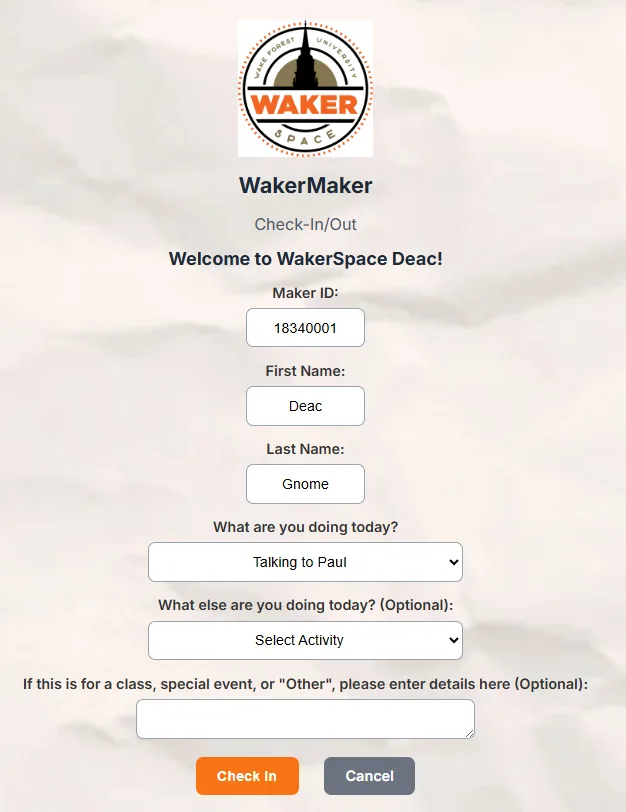
For me, that change came during the academic year 24/25. The University had begun to really look at generative AI and its place in WFU academia. It was also around that time that the university made Google Gemini AI available to the university population. So I began to dabble in AI. It wasn’t until the end of that academic year that I really started to design, test, refine, and work with Gemini to create a proper check-in/out system for WakerSpace. I built a Raspberry Pi database server and installed the backend Maria DB database on it that I had begun a couple of years ago. I prompted Gemini to use the database I created to build a check-in/out system. I chose PHP as the primary language to have Gemini write in. It was built for web work and I knew for this new system to be successful, it would need to be web based. Each time Gemini presented code, I downloaded and tested it. I would then prompt again with the changes I wanted, redownload and test again. This process took place more times than I can remember but finally over the summer of 2025 I had, along with my new BFF Gemini, crafted a new system that allowed makers to scan a QR code, enter their WFU ID, press check-in and have their screen filled out with their name and all they had to do was select their activities from, you guessed it, combo boxes.
It wasn’t until the end of that academic year that I really started to design, test, refine, and work with Gemini to create a proper check-in/out system for WakerSpace.
This data was sent to the backend database and stored for future visits and analytics. When it was time to leave, makers simply scan the QR code and press check-out. The system records the duration of their stay and even reports that back to the maker on their phone. I worked with IS and acquired a cloud based server to put the backend database on, had it backed up every night, and used it as the all-in-one database server, and hosting server for the new system. Using the old Google sheets, I loaded 1 and a half years of back data about the makers into the system. This included their WFU ID (the unique key that everything works off of), their first and last names, and their WFU email. Everyone preloaded was given a first visit date of 01-01-2025 since our old system had no way to track that. This allowed the new system to prepopulate fields when the returning maker scanned the QR code and provided theor WFU ID. In the Fall of 2025, the new system went into production!
In parallel to the new check-in/out portal, I also worked with Gemini to create a web based app that the WakerStaff volunteers could use to track makers that were checked into WakerSpace. This seperate app allows the staff to update activities in case something was entered wrong by the maker, and it allows the tracking of what training makers have taken at WakerSpace, a process that formerly was done manually by putting colored sticker dots on makers WakerSpace badges. We track 5 major trainings on our equipment that are more in depth and have safety concerns that makers need to understand. This is now stored in our database. WakerStaff can also manually check makers in or out if needed as well as see a dashboard with metrics on number of makers in the space, first time visitors, and many other metrics about WakerSpace. Other enhancements have been added to the admin console to simplify WakerStaff tasks centered around the check-in/out system.
In parallel to the new check-in/out portal, I also worked with Gemini to create a web based app that the WakerStaff volunteers could use to track makers that were checked into WakerSpace.
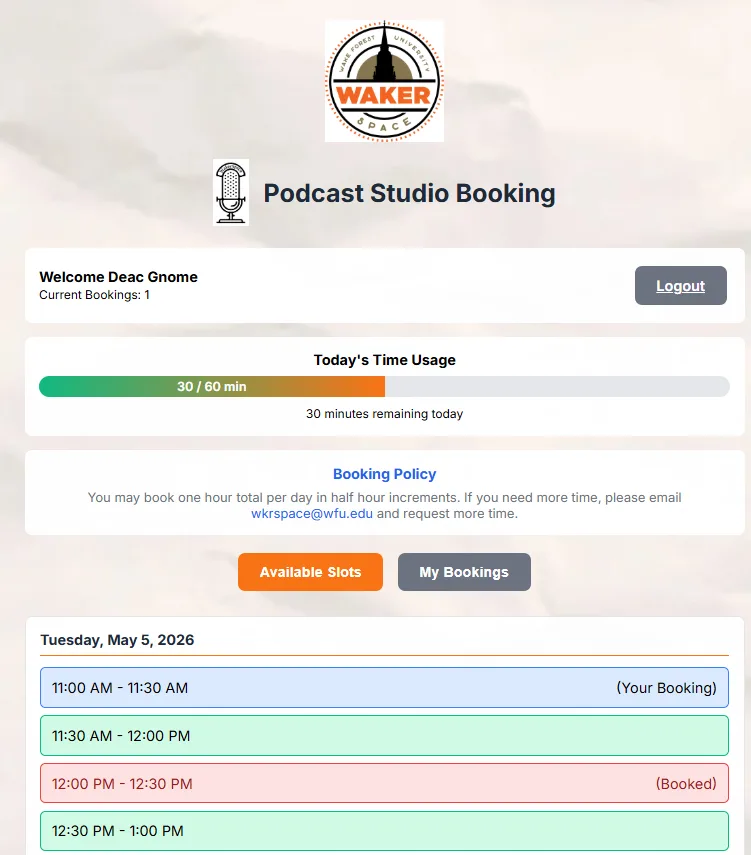
The journey continued over winter break 25. First, I started using my new BFF Claude. I uploaded all of my code created with Gemini to Claude and began refining and adding features to both the check-in/out and admin console. I also added a podcast room self reservation system with Claude including all of the dashboards and functionality to manage the system. This removed the manual entry of reservations into the WakerSpace event calendar and allowed makers to go to our website, click the link, login and reserve the times they needed in real time. No more emails back and forth! Several features help ensure that proper data is entered and that accurate booking slots are presented. The system updates the WakerSpace event calendar and also allows us to block hours, days, and weeks with the admin console.
The 3rd leg of this journey has continued over spring 26. Again using Claude, now my default coding AI code helper, I have created a workshop reservation system for makers to register for our weekly workshops. We have been using Cvent as the reservation system for about 3 years. While Cvent is VERY powerful, it is designed for venues that charge for events, have large scale events, and it does a great job of that. I do find it very cumbersome to use and a huge overkill for what is needed at WakerSpace. The system created with Claude is purpose driven for the needs of WakerSpace, is simple to use, and unifies the look and feel of all the WakerSpace systems, check-in/out, podcast reservations, and workshop registrations.
Using generative AI has given me the ability to create software that is robust and purpose driven for the needs of WakerSpace.
Using generative AI has given me the ability to create software that is robust and purpose driven for the needs of WakerSpace. AI coding has advanced to the point of being able to create very functional programs/apps by using the right prompts. The “prompting” learning curve is real and as I use AI more, I have improved my prompts to be more efficient and accomplish what I need in less prompts. It has also been beneficial that I have experience in coding other languages and have that basic knowledge base to build on. I do believe that a non-programmer can now build apps using generative AI with little knowledge of the underlying systems. However, extensive testing and backups are a very necessary part of using code created by AI. It doesn’t always get things right the first time and sometimes breaks other parts of the app when implementing new features.
The journey continues…….